Location Selector
./location_selector.templ
1. Search Input
Write a search fragment and render it on the page.
Fragment
A fragment is a struct with a Render() templ.Component method.
// fragment constructor
func locationSelector() templ.Component {
	// doors.F - helper function to render the fragment
	// (just calls Render() method)
	return doors.F(&locationSelectorFragment{})
}

type locationSelectorFragment struct {
	// dynamic container to display search options
	optionsDoor doors.Door
}

templ (f *locationSelectorFragment) Render() {
	<h3>Select Country</h3>
	@f.input()
	// input component
	@f.optionsDoor
	// container to render the search results
}
Input Component
Attach an event hook to the input field:
templ (f *locationSelectorFragment) input() {
	// attach input event listener to the next element
	@doors.AInput{
		On: func(ctx context.Context, r doors.REvent[doors.InputEvent]) bool {
			term := r.Event().Value // get the input value
			if len(term) == 0 {     // empty options if string is empty
				f.optionsDoor.Clear(ctx)
				return false // not done, keep the hook active
			}
			term = term[:min(len(term), 16)]           // trim just in case
			f.optionsDoor.Update(ctx, f.options(term)) // update the container
			return false                               // not done, keep the hook active
		},
	}
	<input
		type="search"
		placeholder="Country"
		aria-label="Country"
		autocomplete="off"
	/>
}
doors.AInputcreates a temporary, private endpoint for this element and event.
Options Component
Queries and renders search results.
templ (f *locationSelectorFragment) options(term string) {
	if len(term) < 2 {
		<p>
			<mark>Type at least two letters to search</mark>
		</p>
	} else {
		// search contries in the database
		{{ places, _ := driver.Countries.Search(term) }}
		if len(places) == 0 {
			<i>Nothing found</i>
		} else {
			for _, place := range places {
				<p>
					{ place.Name }
				</p>
			}
		}
	}
}
Render the fragment
./app.templ
templ (a *app) Body() {
	@locationSelector()
}
Result:
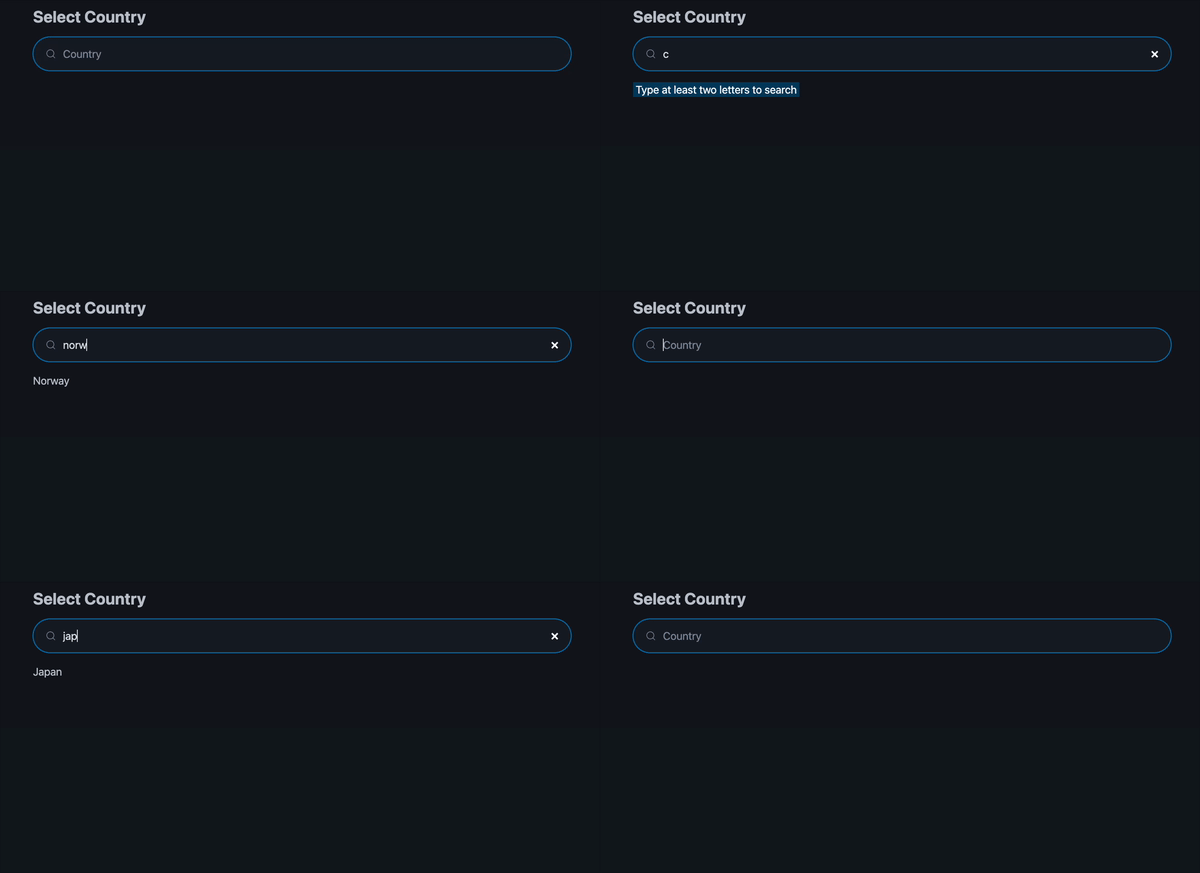
2. Debounce and Loader
You don’t want to stream every keystroke to the server.
Add one line to the input configuration to enable debounce filtering with the Scopes API:
templ (f *locationSelectorFragment) input() {
	@doors.AInput{
		// wait 300 milliseconds after the last input before sending
		// but not more than 600 milliseconds since the first
		Scope: doors.ScopeOnlyDebounce(300*time.Millisecond, 600*time.Millisecond),
		On: func(ctx context.Context, r doors.REvent[doors.InputEvent]) bool {
			/* ... */
			return false
		},
	}
	<input
		type="search"
		placeholder="Country"
		aria-label="Country"
		autocomplete="off"
	/>
}
With debounce, repeated values are more likely. Add a simple check to prevent unnecessary updates:
templ (f *locationSelectorFragment) input() {
	{{ prevValue := "" }}
	@doors.AInput{
		Scope: doors.ScopeOnlyDebounce(300*time.Millisecond, 600*time.Millisecond),
		On: func(ctx context.Context, r doors.REvent[doors.InputEvent]) bool {
			term := r.Event().Value
			term = term[:min(len(term), 16)]
			// proceed only if the value is changed
			if term == prevValue {
				return false
			}
			prevValue = term
			/* container update */
			return false
		},
	}
	<input
		type="search"
		placeholder="Country"
		aria-label="Country"
		autocomplete="off"
	/>
}
doors guarantees that the same hook’s invocations run in series, so
prevValuehas no concurrent access issues.
In practice, responses aren’t instant, so indicate progress to the user.
PicoCSS provides an attribute for this. Use the Indication API to toggle it during pending operations.
templ (f *locationSelectorFragment) Render() {
// added search loader element to the header
<h3>Select Country  <span id="search-loader"></span></h3>
@f.input()
@f.optionsDoor
}
templ (f *locationSelectorFragment) input() {
{{ prevValue := "" }}
@doors.AInput{
// apply attribute aria-busy="true" to the element #search-loader
Indicator: doors.IndicatorOnlyAttrQuery("#search-loader", "aria-busy", "true"),
Scope: doors.ScopeOnlyDebounce(300*time.Millisecond, 600*time.Millisecond),
On: func(ctx context.Context, r doors.REvent[doors.InputEvent]) bool {
term := r.Event().Value
term = term[:min(len(term), 16)]
if term == prevValue {
return false
}
prevValue = term
/* container update */
return false
},
}
<input type="search" placeholder="Country" aria-label="Country" autocomplete="off"/>
}
Debounce and indication together (simulated latency):
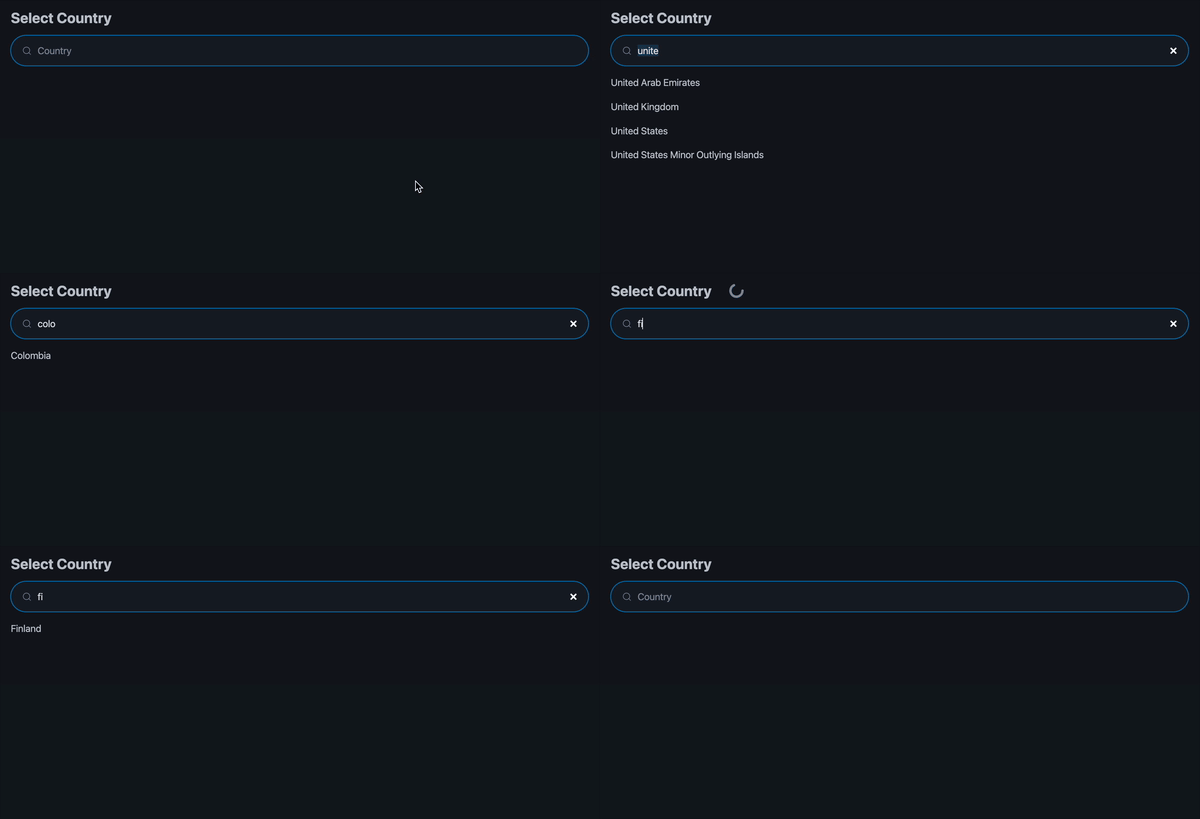
The indication clears after all hook-triggered changes apply on the client.
3. Reactive State
Country and city selection can use Door only, without any reactive state.
However, in multi-step forms and complex UIs, this “low-level” approach spreads logic across handlers and hurts readability and debuggability.
A single source of truth in that case significantly reduces mental overhead.
Country Selection
Add a Source Beam and subscribe to it in the render function:
func locationSelector() templ.Component {
	return doors.F(&locationSelectorFragment{
		// create beam with the initial value (empty driver.Place)
		selectedCountry: doors.NewSourceBeam(driver.Place{}),
	})
}

type locationSelectorFragment struct {
	optionsDoor doors.Door
	// add beam field to the fragment
	selectedCountry doors.SourceBeam[driver.Place]
}

templ (f *locationSelectorFragment) Render() {
	/// subscribe to the selected country value stream
	@doors.Sub(f.selectedCountry, func(p driver.Place) templ.Component {
		// if country is empty, show selector
		if p.Name == "" {
			return f.selectCountry()
		}
		return f.showSelectedCountry(p)
	})
}
Country selector component (previously was inside the main render function):
templ (f *locationSelectorFragment) selectCountry() {
<h3>Select Country  <span id="search-loader"></span></h3>
@f.input()
@f.optionsDoor
}
Show the selected country and a reset button:
templ (f *locationSelectorFragment) showSelectedCountry(p driver.Place) {
    <h3>Country: <b>{ p.Name }</b></h3>
    @doors.AClick{
        // indicate on the button
        Indicator: doors.IndicatorOnlyAttr("aria-busy", "true"),
        // block repeated clicks
        Scope: doors.ScopeOnlyBlocking(),
        On: func(ctx context.Context, r doors.REvent[doors.PointerEvent]) bool {
            // clear the country selection
            f.selectedCountry.Update(ctx, driver.Place{})
            // hook is done, remove it
            return true
        },
    }
    <button class="secondary">Change</button>
}
Update the beam on the option click:
templ (f *locationSelectorFragment) options(term string) {
	if len(term) < 2 {
		<p>
			<mark>Type at least two letters to search</mark>
		</p>
	} else {
		{{ places, _ := driver.Countries.Search(term) }}
		if len(places) == 0 {
			<i>Nothing found</i>
		} else {
			// create a blocking scope to apply on all options
			{{ scope := doors.ScopeOnlyBlocking() }}
			for _, place := range places {
				// attach click handler
				@doors.AClick{
					Scope: scope,
					On: func(ctx context.Context, r doors.REvent[doors.PointerEvent]) bool {
						// update the beam with the selected country
						f.selectedCountry.Update(ctx, place)
						// done
						return true
					},
				}
				<p role="link" class="secondary">
					{ place.Name }
				</p>
			}
		}
	}
}
BlockingScopecancels all new events while the previous one is being processed. It reduces unnecessary requests and clarifies intent.Also, note that we used the same scope set for all search options, which effectively means that events from all handlers pass through a single pipeline, allowing only one active handler.
Let’s see how selection works with reactive state:
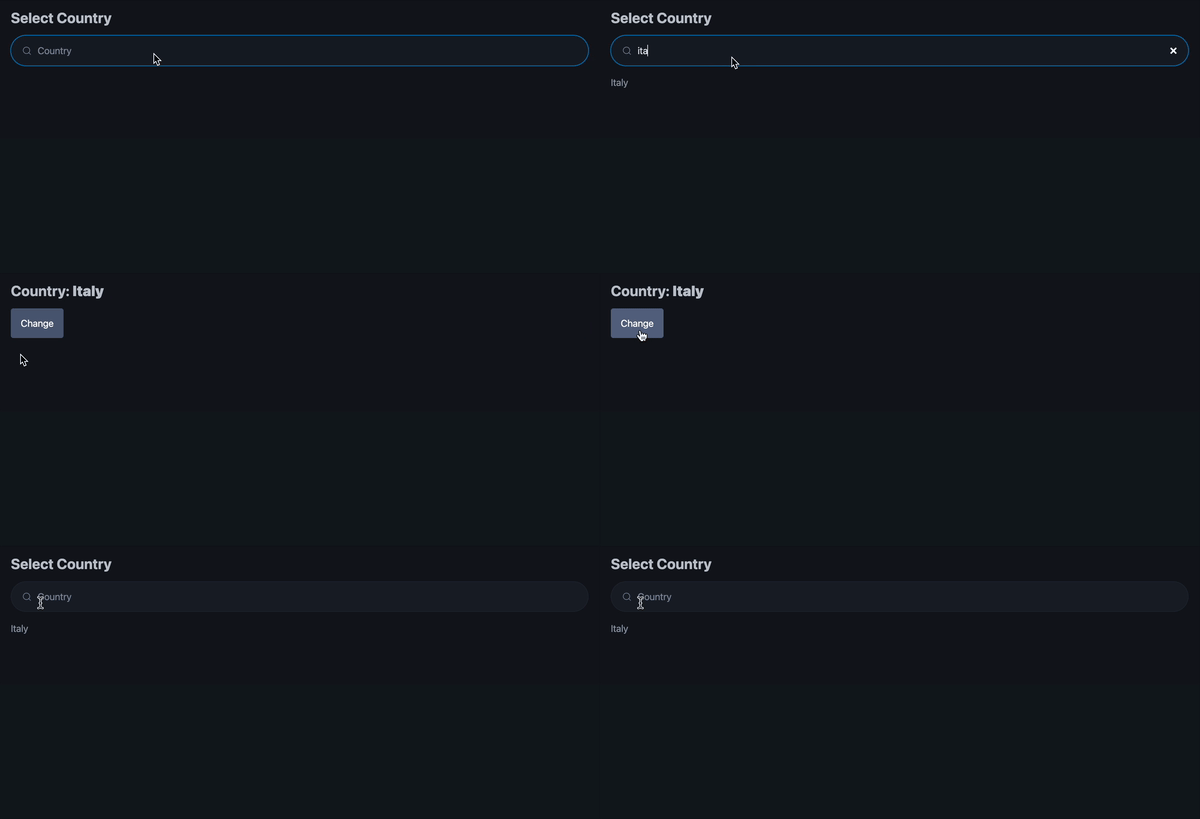
Search results weren’t cleared. That makes sense; we didn’t clear them.
templ (f *locationSelectorFragment) selectCountry() {
<h3>Select Country  <span id="search-loader"></span></h3>
@f.input()
// clear options before rendering
{{ f.optionsDoor.Clear(ctx) }}
@f.optionsDoor
}
Result:
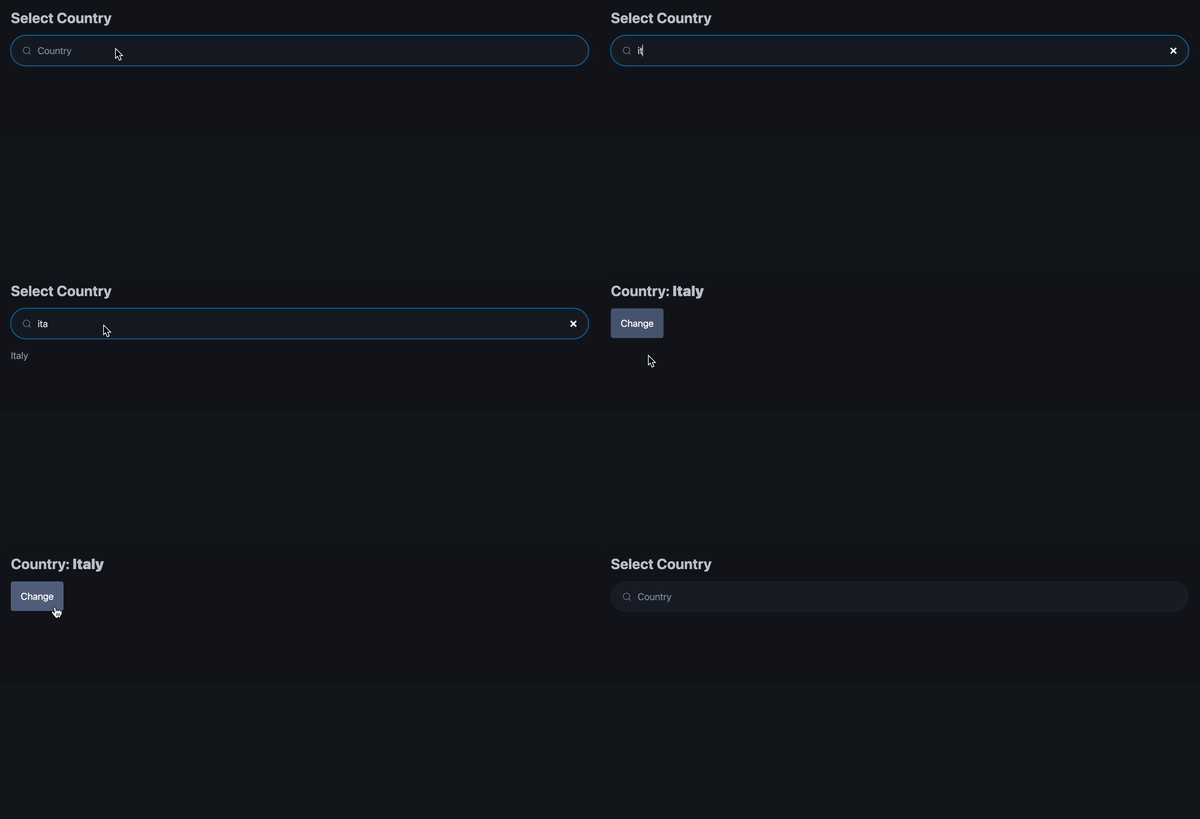
4. Location Selector
The country selector is a prototype for an abstract place selector. Comment it out for now.
Plan:
Add Source Beam to the location selector that holds combined country and city data.
Derive separate Beams for country and city values.
Transform our previous country selector into an abstract “place” selector.
Write the location selector render function with the place selectors.
Let’s Go!
Create a Source Beam that holds country and city data.
type selectedLocation struct {
	country driver.Place
	city    driver.Place
}

func locationSelector() templ.Component {
	location := doors.NewSourceBeam(selectedLocation{})
	return doors.F(&locationSelectorFragment{
		location: location,
	})
}

type locationSelectorFragment struct {
	location doors.SourceBeam[selectedLocation]
}
Derive the country and city Beams.
func locationSelector() templ.Component {
	location := doors.NewSourceBeam(selectedLocation{})
	// derive the country beam
	country := doors.NewBeam(location, func(p selectedLocation) driver.Place {
		return p.country
	})
	// derive the city beam
	city := doors.NewBeam(location, func(p selectedLocation) driver.Place {
		return p.city
	})
	return doors.F(&locationSelectorFragment{
		location: location,
		country:  country,
		city:     city,
	})
}

type locationSelectorFragment struct {
	location doors.SourceBeam[selectedLocation]
	country  doors.Beam[driver.Place]
	city     doors.Beam[driver.Place]
}
Abstract the place selector.
Structure:
type placeSelector struct {
	// label for headers
	label string
	// function to search
	query func(string) ([]driver.Place, error)
	// function to update selected value
	update func(context.Context, driver.Place)
	// beam that holds selected value
	value       doors.Beam[driver.Place]
	optionsDoor doors.Door
}
Methods from our previous country selector with minimal changes (see comments):
Main render:
templ (f *placeSelector) Render() {
	// some layout
	<section>
		// subscribe to the provided beam
		@doors.Sub(f.value, func(p driver.Place) templ.Component {
			if p.Name == "" {
				return f.selectPlace()
			}
			return f.showSelectedPlace(p)
		})
	</section>
}
Show selected:
templ (f *placeSelector) showSelectedPlace(p driver.Place) {
	// use label
	<h3>{ f.label }: <b>{ p.Name }</b></h3>
	@doors.AClick{
		Indicator: doors.IndicatorOnlyAttr("aria-busy", "true"),
		Scope:     doors.ScopeOnlyBlocking(),
		On: func(ctx context.Context, r doors.REvent[doors.PointerEvent]) bool {
			// update via provided function
			f.update(ctx, driver.Place{})
			return true
		},
	}
	<button class="secondary">Change</button>
}
Select place:
templ (f *placeSelector) selectPlace() {
// use label and construct unique id for the loader
<h3>Select { f.label }  <span id={ "search-loader-" + f.label }></span></h3>
@f.input()
{{ f.optionsDoor.Clear(ctx) }}
@f.optionsDoor
}
Input:
templ (f *placeSelector) input() {
	{{ prevValue := "" }}
	@doors.AInput{
		// use unique id to apply indication
		Indicator: doors.IndicatorOnlyAttrQuery("#search-loader-"+f.label, "aria-busy", "true"),
		Scope:     doors.ScopeOnlyDebounce(300*time.Millisecond, 600*time.Millisecond),
		On: func(ctx context.Context, r doors.REvent[doors.InputEvent]) bool {
			term := r.Event().Value
			term = term[:min(len(term), 16)]
			if term == prevValue {
				return false
			}
			prevValue = term
			if len(term) == 0 {
				f.optionsDoor.Clear(ctx)
				return false
			}
			f.optionsDoor.Update(ctx, f.options(term))
			return false
		},
	}
	// use the label value
	<input type="search" placeholder={ f.label } aria-label={ f.label } autocomplete="off"/>
}
And options:
templ (f *placeSelector) options(term string) {
	if len(term) < 2 {
		<p>
			<mark>Type at least two letters to search</mark>
		</p>
	} else {
		// use provided function to search
		{{ places, _ := f.query(term) }}
		if len(places) == 0 {
			<i>Nothing found</i>
		} else {
			{{ scope := doors.ScopeOnlyBlocking() }}
			for _, place := range places {
				@doors.AClick{
					Scope: scope,
					On: func(ctx context.Context, r doors.REvent[doors.PointerEvent]) bool {
						// use provided function to update
						f.update(ctx, place)
						return true
					},
				}
				<p role="link" class="secondary">
					{ place.Name }
				</p>
			}
		}
	}
}
Use our place selectors in the location selector render.
templ (f *locationSelectorFragment) Render() {
	<article>
		// country selector fragment
		@doors.F(&placeSelector{
			label: "Country",
			query: driver.Countries.Search,
			update: func(ctx context.Context, p driver.Place) {
				// update location with the selected country
				// and no city selected
				f.location.Update(ctx, selectedLocation{country: p})
			},
			// provide the country beam
			value: f.country,
		})
		// city depends on the country
		@doors.Sub(f.country, func(country driver.Place) templ.Component {
			// no country selected, no need to render the city selection
			if country.Name == "" {
				return nil
			}
			return doors.F(&placeSelector{
				label: "City",
				query: func(s string) ([]driver.Place, error) {
					// search for cities in the provided country
					return driver.Cities.Search(country.Id, s)
				},
				update: func(ctx context.Context, p driver.Place) {
					// mutate location with the new city
					f.location.Mutate(ctx, func(sl selectedLocation) selectedLocation {
						sl.city = p
						return sl
					})
				},
				// provide the city beam
				value: f.city,
			})
		})
	</article>
}
Dynamic form with reactive state:
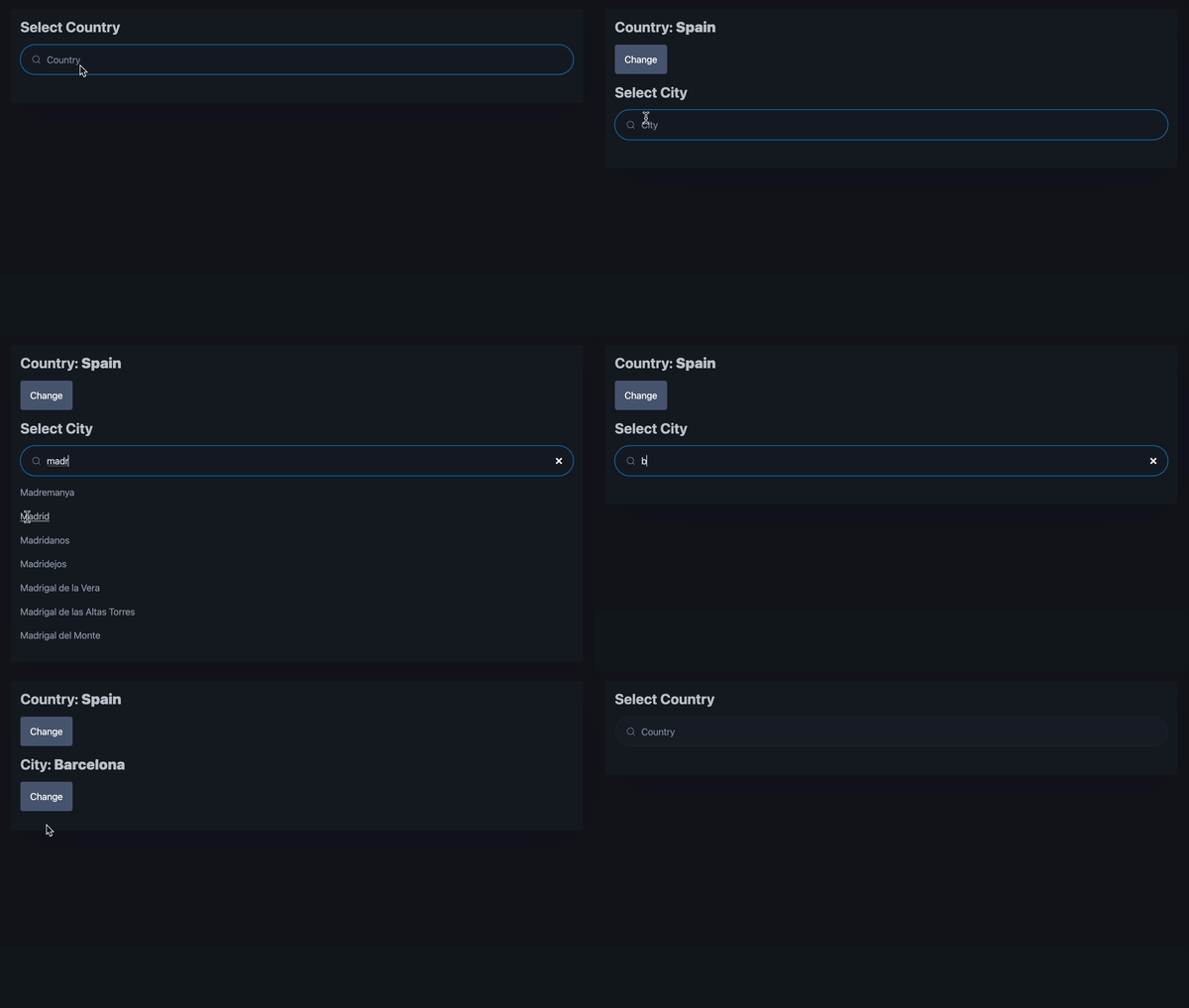
Beam is a communication primitive with a value stream. You can watch it directly or use doors.Sub/doors.Inject to render a Door that updates automatically on change.
It has a few important properties:
1. Triggers subscribers only on value change. By default it uses ==to decide if an update is needed; you can supply a custom equality function.
Synchronized with rendering. During a render pass, all participating nodes observe the same value.
Propagates changes top-to-bottom. In other words, subscribers who are responsible for more significant parts of the DOM will be triggered first.
Stale propagation is canceled. Cancels stale propagation if the value changes mid-propagation (override with
NoSkipon Source Beam if needed).Derived beams update as a group. Subscription handlers run in parallel on a goroutine pool.
All these properties together just make it work as expected - you rarely need to think about it.
Bonus: Improve the UX
Missing keyboard support in a form is annoying.
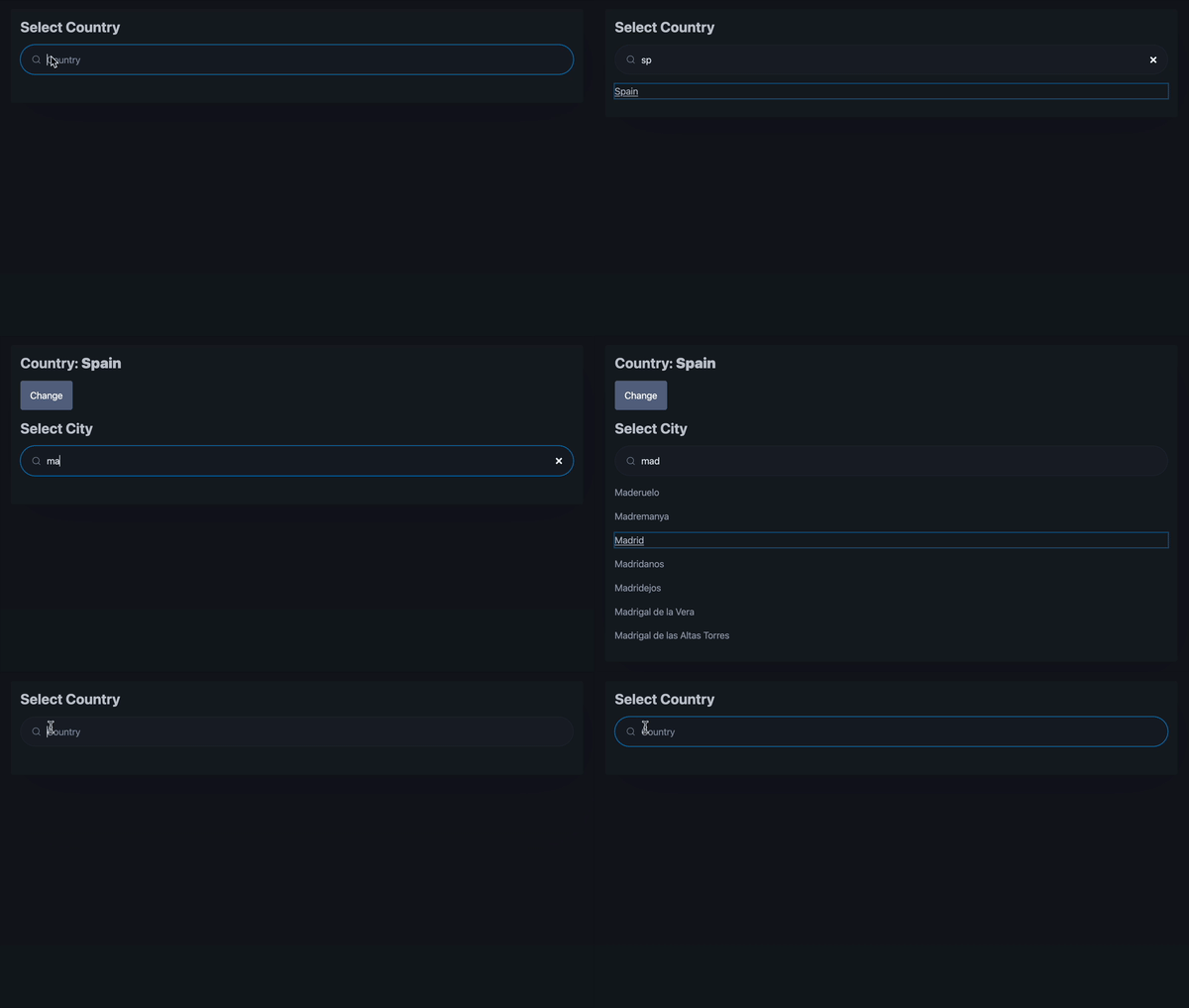
Add keyboard support:
Autofocus on the input.
Tab and enter support on options.
Wiring up some JS
Focus by Id via JS:
templ (f *placeSelector) input() {
	/* ... */
	{{ inputId := "search-input-" + f.label }}
	<input id={ inputId } type="search" placeholder={ f.label } aria-label={ f.label } autocomplete="off"/>
	// provide data to the next element
	@doors.AData{
		Name:  "id",
		Value: inputId,
	}
	// wraps script in anonymous function, provides $... variables to access the framework,
	// enables await, and converts inline script to cacheable, static and minified resource (!)
	@doors.Script() {
		<script>
            // read id with magic $d
            const id = $data("id")
            // get the element and focus
            const el = document.getElementById(id)
            el.focus()
        </script>
	}
}
Better: make it a reusable component:
templ focus(id string) {
	@doors.AData{
		Name:  "id",
		Value: id,
	}
	@doors.Script() {
        <script>
            const id = $data("id")
            const el = document.getElementById(id)
            el.focus()
        </script>
	}
}
doors.Scriptis awesome. It converts inline script into a minified (unless configured otherwise), cacheable script with src, protects global scope, and enablesawait. Additionally, it compiles TypeScript if you providetype="application/typescript"attribute.
Enabling Tab + Enter
Attach a key event hook and add tabindex to options:
templ (f *placeSelector) options(term string) {
	/* ... */
	{{ scope := doors.ScopeOnlyBlocking() }}
	for _, place := range places {
		// attach keydown event hook
		@doors.AKeyDown{
			Scope: scope,
			// filter by "Enter" key
			Filter: []string{"Enter"},
			On: func(ctx context.Context, r doors.REvent[doors.KeyboardEvent]) bool {
				f.update(ctx, place)
				return true
			},
		}
		@doors.AClick{
			Scope: scope,
			On: func(ctx context.Context, r doors.REvent[doors.PointerEvent]) bool {
				f.update(ctx, place)
				return true
			},
		}
		// add tabindex attribute
		<p tabindex="0" role="link" class="secondary">
			{ place.Name }
		</p>
	}
	/* ... */
}
Keyboard control enabled:
Next: Path and Title
Code
./location_selector.templ
package main
import (
"context"
"github.com/derstruct/doors-dashboard/driver"
"github.com/doors-dev/doors"
"time"
)
type selectedLocation struct {
country driver.Place
city driver.Place
}
func locationSelector() templ.Component {
location := doors.NewSourceBeam(selectedLocation{})
// derive the country beam
country := doors.NewBeam(location, func(p selectedLocation) driver.Place {
return p.country
})
// derive the city beam
city := doors.NewBeam(location, func(p selectedLocation) driver.Place {
return p.city
})
return doors.F(&locationSelectorFragment{
location: location,
country: country,
city: city,
})
}
type locationSelectorFragment struct {
location doors.SourceBeam[selectedLocation]
country doors.Beam[driver.Place]
city doors.Beam[driver.Place]
}
templ (f *locationSelectorFragment) Render() {
<article>
// country selector fragment
@doors.F(&placeSelector{
label: "Country",
query: driver.Countries.Search,
update: func(ctx context.Context, p driver.Place) {
// update location with the selected country
// and no city selected
f.location.Update(ctx, selectedLocation{country: p})
},
// provide the country beam
value: f.country,
})
// city depends on the country
@doors.Sub(f.country, func(country driver.Place) templ.Component {
// no country selected, no need to render the city selection
if country.Name == "" {
return nil
}
return doors.F(&placeSelector{
label: "City",
query: func(s string) ([]driver.Place, error) {
// search for cities in the provided country
return driver.Cities.Search(country.Id, s)
},
update: func(ctx context.Context, p driver.Place) {
// mutate location with the new city
f.location.Mutate(ctx, func(sl selectedLocation) selectedLocation {
sl.city = p
return sl
})
},
// provide the city beam
value: f.city,
})
})
</article>
}
type placeSelector struct {
// label for headers
label string
// function to search
query func(string) ([]driver.Place, error)
// function to update selected value
update func(context.Context, driver.Place)
// beam that holds selected value
value doors.Beam[driver.Place]
optionsDoor doors.Door
}
templ (f *placeSelector) Render() {
// some layout
<section>
// subscribe to the provided beam
@doors.Sub(f.value, func(p driver.Place) templ.Component {
if p.Name == "" {
return f.selectPlace()
}
return f.showSelectedPlace(p)
})
</section>
}
templ (f *placeSelector) showSelectedPlace(p driver.Place) {
// use label
<h3>{ f.label }: <b>{ p.Name }</b></h3>
@doors.AClick{
Indicator: doors.IndicatorOnlyAttr("aria-busy", "true"),
Scope: doors.ScopeOnlyBlocking(),
On: func(ctx context.Context, r doors.REvent[doors.PointerEvent]) bool {
// update via provided function
f.update(ctx, driver.Place{})
return true
},
}
<button class="secondary">Change</button>
}
templ (f *placeSelector) selectPlace() {
// use label and construct unique id for the loader
<h3>Select { f.label }  <span id={ "search-loader-" + f.label }></span></h3>
@f.input()
{{ f.optionsDoor.Clear(ctx) }}
@f.optionsDoor
}
templ (f *placeSelector) input() {
{{ prevValue := "" }}
@doors.AInput{
// use unique id to apply indication
Indicator: doors.IndicatorOnlyAttrQuery("#search-loader-"+f.label, "aria-busy", "true"),
Scope: doors.ScopeOnlyDebounce(300*time.Millisecond, 600*time.Millisecond),
On: func(ctx context.Context, r doors.REvent[doors.InputEvent]) bool {
term := r.Event().Value
term = term[:min(len(term), 16)]
if term == prevValue {
return false
}
prevValue = term
if len(term) == 0 {
f.optionsDoor.Clear(ctx)
return false
}
f.optionsDoor.Update(ctx, f.options(term))
return false
},
}
{{ inputId := "search-input-" + f.label }}
<input id={ inputId } type="search" placeholder={ f.label } aria-label={ f.label } autocomplete="off"/>
@focus(inputId)
}
templ focus(id string) {
@doors.AData{
Name: "id",
Value: id,
}
@doors.Script() {
<script>
const id = $data("id")
const el = document.getElementById(id)
el.focus()
</script>
}
}
templ (f *placeSelector) options(term string) {
if len(term) < 2 {
<p>
<mark>Type at least two letters to search</mark>
</p>
} else {
{{ places, _ := f.query(term) }}
if len(places) == 0 {
<i>Nothing found</i>
} else {
{{ scope := doors.ScopeOnlyBlocking() }}
for _, place := range places {
// attach keydown event hook
@doors.AKeyDown{
Scope: scope,
// filter by "Enter" key
Filter: []string{"Enter"},
On: func(ctx context.Context, r doors.REvent[doors.KeyboardEvent]) bool {
f.update(ctx, place)
return true
},
}
@doors.AClick{
Scope: scope,
On: func(ctx context.Context, r doors.REvent[doors.PointerEvent]) bool {
f.update(ctx, place)
return true
},
}
// add tabindex attribute
<p tabindex="0" role="link" class="secondary">
{ place.Name }
</p>
}
}
}
}